This description refers to the previous version of the application – the screens may look different from the current ones.
Sending SMS messages to drivers is free of charge
Managing a vehicle fleet often requires the exchange of text information with drivers and other field employees. The GPS tracking system allows for such communication directly from the system. It is completely free and unlimited. There is no need to install any special or expensive text terminals. Our programme uses the driver's mobile phone for this purpose. The article below describes how this function works.
To use this feature, you need to:
- Add a telephone contact to the database
- Assign the contact to a driver
- Assign the driver to a vehicle
We will now describe each phase of this configuration so that every user of our vehicle tracking programme knows how to do it.
Adding a telephone contact to the database
First, you need to enter the contact details of the person with whom you will be exchanging text messages. To do this:
Log in to the system:
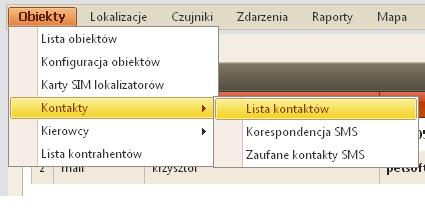
Menu > Objects > Contacts > Contact list
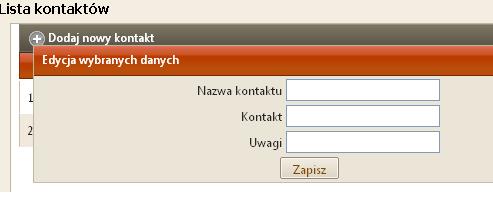
Assigning a contact to a driver, and a driver to a vehicle
For the programme to know where to send the SMS, you need to assign the contact to a driver. Then, you must assign the driver to a vehicle. To do this, please refer to this article, which explains how to proceed. After these configuration steps, you can send SMS messages to drivers. This can be done directly from the driver list or from any list where the SMS communication icon is available.
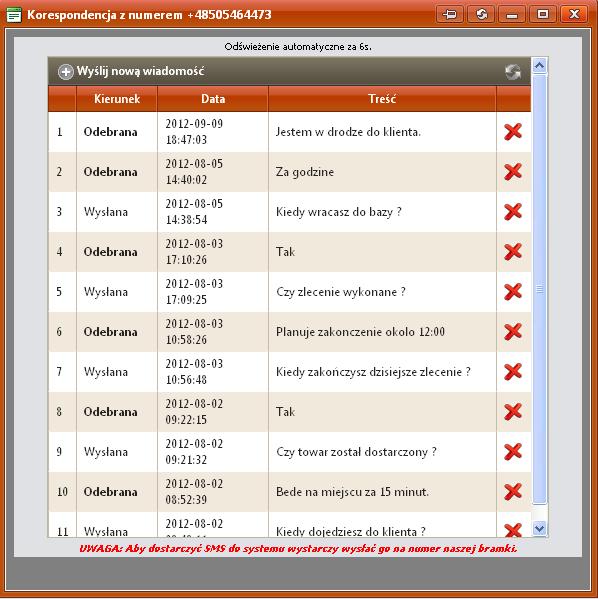
Clicking the SMS communication icon opens the communication window. This window contains the SMS communication history with the driver, sorted from the most recent. The communication window refreshes automatically every 10 seconds, or you can refresh it manually using the appropriate icon on the toolbar.