
This description refers to the previous version of the application – the screens may look different from the current ones.
Rules for describing inputs and outputs
If the monitored vehicle is equipped with the "Monitoring Machina" (Monitoring Machina) version of monitoring based on the mL900-8p tracker, it becomes possible to control outputs and retrieve the status of digital and analogue inputs of this GPS receiver. However, to perform these actions conveniently, these inputs and outputs should be described in the system. This will make their control straightforward. Otherwise, you would have to use predefined names such as "Input1" or "Output2", which, as you can see, is very inconvenient and does not clearly indicate what they refer to. The described tracker features:
- 8 digital inputs
- 3 digital outputs (open collector type)
- 2 analogue inputs
To access the page allowing you to describe inputs and outputs, go to:
Menu > Sensors > Define input and output names (Menu > Czujniki > Definicja nazw wejść i wyjść)
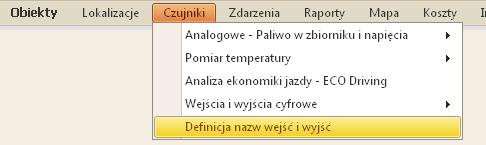
After navigating to the name editing page, select the GPS tracker whose inputs and outputs you wish to edit. Then, download the data. On the screen, you will see a list containing inputs and outputs as well as a list of vehicles. The names displayed in the table can be edited by clicking the Edit icon in each row. If you are viewing the table for the first time, the names and SMS commands are set to default values. These default values are precisely what you can edit.
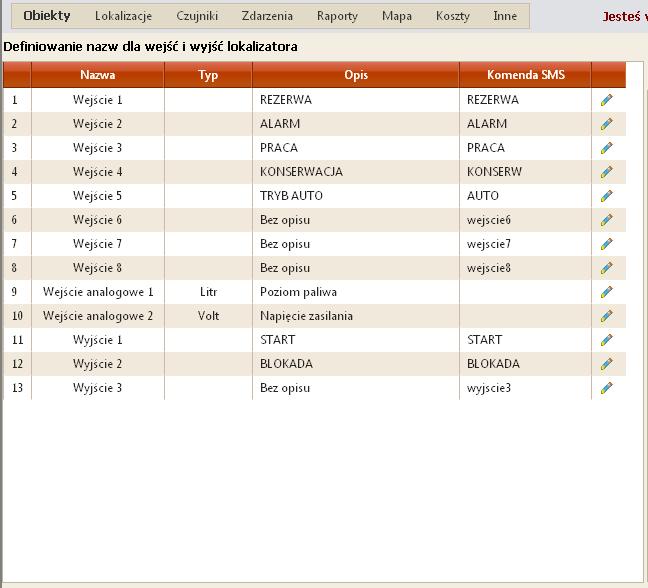
- Define the data type for the analogue input (Volt/Litre)
- Description of the input/output
- SMS command
Analogue input type
Various signals can be connected to the analogue inputs. This could be a signal from a fuel level probe, a float from the tank, battery voltage, etc. Depending on the physical value the input is to represent, it should be described here. Most commonly, this is "Volt" or "Litre".
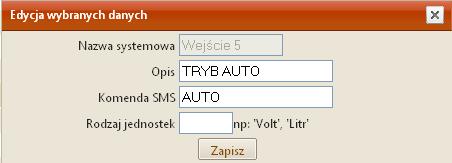
Description
Here, you should enter the name that will be displayed in the system to describe the given object. For example, this could be "Fuel reserve" or "Engine operation". These descriptions are very helpful in daily use and are worth completing.
SMS command
Our mL900-8p GPS tracker allows for control and data retrieval via SMS. Here, you should define the commands that will be recognised by the device. This approach makes it easy to remember how to communicate with the tracker via SMS.