
This description refers to the previous version of the application – the screens may look different from the current ones.
Description of the mL900-8p tracker capabilities
In most cases, monitored vehicle fleets are only tracked for their geographical location and speed. Based on this, the fleet manager can manage their fleet relatively efficiently. However, sometimes there is a need to monitor machines or special vehicles. In such cases, a solution is required that allows remote control of supervised circuits. This task can be performed by our monitoring in the "Machine Monitoring" ("Monitoring Machina") version based on the GPS tracker mL900-8p. The described tracker features:
- 8 digital inputs
- 3 digital outputs (open collector type)
- Input for a temperature sensor
After logging into our monitoring system, go to:
Menu > Sensors > Digital inputs and outputs > Control and current states (Menu > Czujniki > Wejścia i wyjścia cyfrowe > Sterowanie i aktualne stany)
Here you will find the information centre regarding the status of the tracker's digital inputs and outputs.

Now select a vehicle or machine from the list on the right. After clicking on the chosen object, you will see a list of digital inputs and outputs with their current states and control buttons.
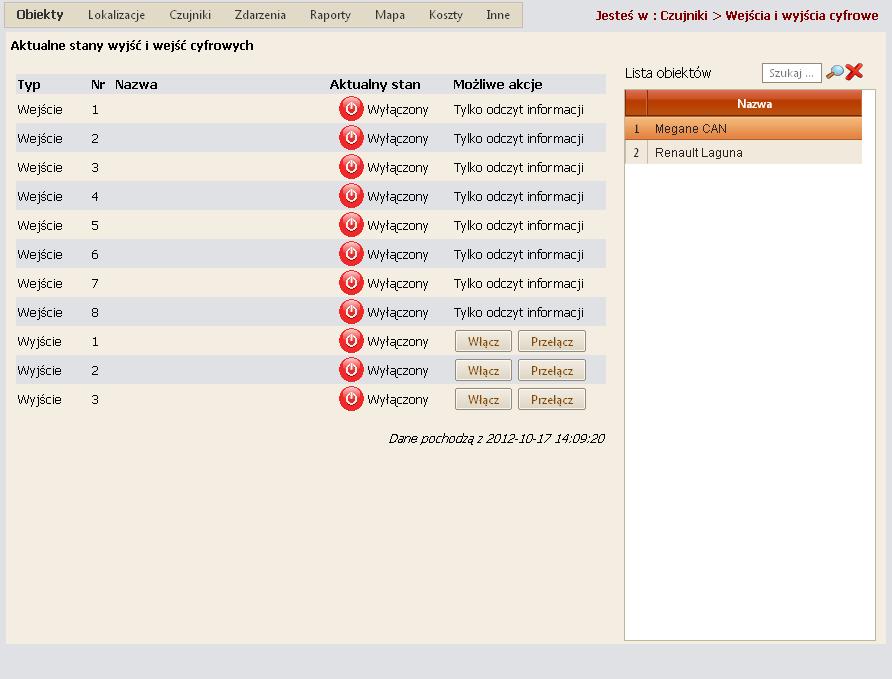
The image above shows such a data set. Of course, the inputs and outputs can be named as you wish, but this topic will be discussed in another article.
Digital inputs are presented in order from 1 to 8. In the column, you can check their current state. Off means the input is not connected to voltage, i.e. it is at ground potential. The On state means that a voltage of 12V or 24V is applied. Naturally, inputs can only be read.
Digital outputs are shown below the list of inputs, in order from 1 to 3. These are open collector circuits. If they are in the off state, this means high impedance. In the on state, they are in low impedance and can conduct current. As these are outputs, they can be controlled. The following commands are available for outputs:
On – activates the circuit
Off – deactivates the circuit
Toggle – changes the current state of the circuit for 3 seconds and then returns to the previous state
As you can see, there are many control possibilities. All commands can be issued from our software. States are updated approximately 30–50 seconds after being issued, so please wait a moment. It is also possible to control via SMS commands, but these functions are described in another article and in the user manual for this tracker.