
This description refers to the previous version of the application – the screens may look different from the current ones.
Driver driving technique analysis
When fuel prices reach new highs, fleet managers are often tasked with optimising the fuel consumption of monitored vehicle fleets. Of course, at the most basic level, it is sufficient to eliminate unnecessary vehicle journeys. Here, the features of our GPS tracking system become helpful. It allows you to analyse the driver’s driving technique, currently known as "Eco Driving". Naturally, this is a broad topic, but in this article, we focus specifically on the aspect of monitoring certain parameters. The functions described below are supported by the mL300-CAN tracker. This is because it is necessary to monitor engine RPM and accelerator pedal position in the vehicle.

After logging into our fleet monitoring software, go to:
Menu > Sensors > Driving efficiency analysis – ECO Driving (Menu > Czujniki > Analiza ekonomiki jazdy - ECO Driving)
You will see a screen with a map prepared to receive data. It contains a map, time range controls, and a list of vehicles. Select the control time range and the vehicle. Then download the data using the "Show data" ("Pokaż dane") button.
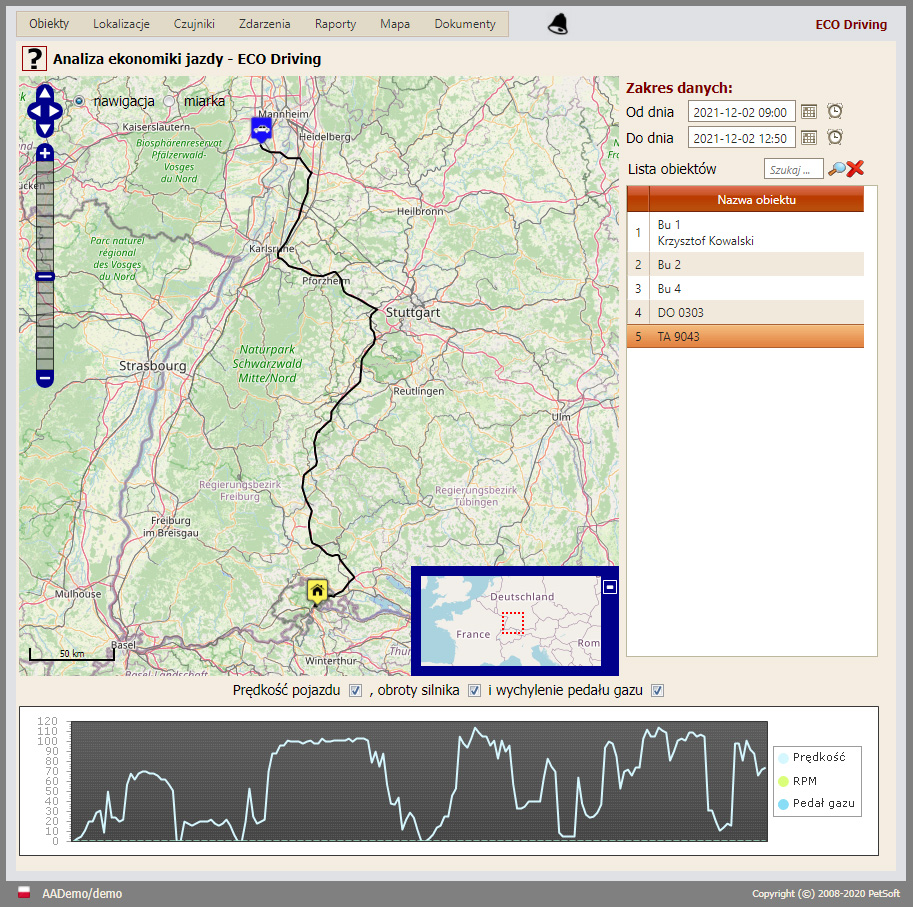
After performing this operation, the screen will display a set of relevant data for analysing the driver’s driving technique. In addition to the route drawn on the map, there is an interesting chart below it.
It includes:
- Speed chart
- Engine RPM chart
- Accelerator pedal position chart
The above data form the basis for analysing the driver’s driving technique, as provided by our vehicle and machinery monitoring software. A driver who presses the accelerator pedal to the so-called "floor" or revs the engine at high RPM will inevitably consume excessive amounts of fuel. From experience, we know that in such cases, comparative analysis against other drivers or a test drive yields the best results.